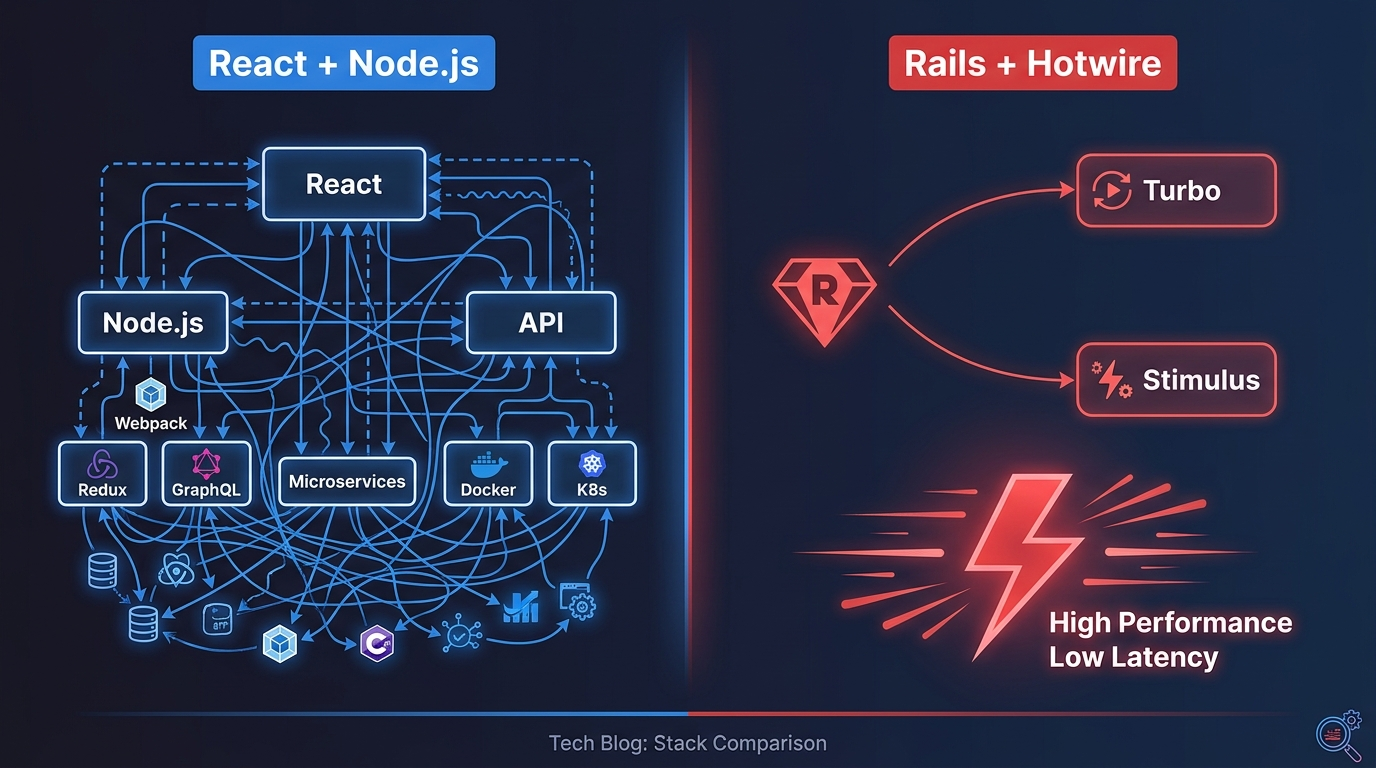
You're building a Rails app. You want it to feel fast and interactive.
Your first thought might be React. Or Vue. Or some other JavaScript framework.
But what if I told you that you don't need any of them?
Rails has its own frontend solution. It's called Hotwire. It's built into Rails 7. And it handles most interactive features with far less code.
Let me show you how it works.
The Short Answer
Hotwire is Rails' modern frontend approach. It consists of Turbo and Stimulus.
Turbo handles page updates without JavaScript: faster navigation, inline editing, real-time updates.
Stimulus adds JavaScript behavior to specific elements: copy buttons, form validation, dynamic UI.
Together, they replace most SPA frameworks. One language. One codebase. No separate frontend.
Part 1: What is Hotwire?
Hotwire stands for HTML Over The Wire.
Instead of sending JSON from the backend and rendering it on the frontend, Hotwire sends HTML directly.
Traditional SPA: Browser → JSON API → React → Render
Hotwire: Browser → HTML → Turbo → Update
This is faster. Simpler. And uses far less code.
The Two Parts
| Component | Purpose |
|---|---|
| Turbo | Handles HTML updates: navigation, forms, real-time |
| Stimulus | Adds JavaScript behavior to specific elements |
Why It Matters
| Problem | Solution |
|---|---|
| Slow page loads | Turbo Drive speeds navigation |
| Complex form interactions | Turbo Frames handle inline edits |
| Real-time updates | Turbo Streams push changes |
| JavaScript boilerplate | Stimulus provides structure |
Part 2: Why Not React?
Before we dive into Hotwire, let's be honest about when it's better than React.
The Cost of React
| Factor | React + Rails API | Rails + Hotwire |
|---|---|---|
| Codebases | 2 (Rails + React) | 1 (Rails) |
| Languages | Ruby + JavaScript | Ruby (and a little JS) |
| API maintenance | Yes, constant | No |
| Onboarding time | Weeks | Days |
| Deployment complexity | High | Low |
| Lines of code | 2x-3x more | Less |
When to Use React
React is still the right choice when:
- Real-time collaboration (Figma, Google Docs)
- Offline-first applications
- Desktop-like complex UI (drag-and-drop, complex state)
- Mobile apps with React Native
- Your team already knows React
When to Use Hotwire
Hotwire is better when:
- Most CRUD apps (B2B SaaS, internal tools)
- Simple to moderate interactivity
- You want to ship fast
- You're a solo developer or small team
- You want one codebase, one language
For most Rails apps, Hotwire is the better choice.
Part 3: Turbo Drive
Turbo Drive makes page navigation faster. It intercepts link clicks and form submissions, fetches the new page in the background, and replaces the body content.
How It Works
// No code needed. It just works.
// Turbo intercepts all links and form submissions
<%# Regular Rails link - Turbo handles it automatically %>
<%= link_to "About", about_path %>
Why It's Faster
| Traditional | Turbo Drive |
|---|---|
| Full page reload | Only body content updates |
| Re-downloads all assets | Reuses CSS and JavaScript |
| Flash of white page | Smooth transition |
Opting Out
Sometimes you don't want Turbo behavior.
<%# Disable Turbo for specific links %>
<%= link_to "Logout", logout_path, data: { turbo: false } %>

<%# Or disable for forms %>
<%= form_with model: @user, data: { turbo: false } do |f| %>
Turbo in the Browser
// Listen to Turbo events
document.addEventListener("turbo:load", function() {
  console.log("Page loaded via Turbo");
});

document.addEventListener("turbo:before-fetch-request", function() {
  // Show loading spinner
});

document.addEventListener("turbo:visit", function() {
  // Track page visits
});
Part 4: Turbo Frames
Turbo Frames update specific parts of a page without reloading the whole thing.
Basic Frame
<%= turbo_frame_tag "product_list" do %>
  <%= render @products %>
<% end %>
Lazy Loading
<%# Content loads only when scrolled into view %>
<%= turbo_frame_tag "comments", src: comments_path(@product), loading: :lazy do %>
  <p>Loading comments...</p>
<% end %>
Inline Editing
<%# app/views/products/index.html.erb %>
<%= turbo_frame_tag "product_#{product.id}" do %>
  <div class="product">
    <h3><%= product.name %></h3>
    <p><%= product.price %></p>
    <%= link_to "Edit", edit_product_path(product) %>
  </div>
<% end %>

<%# app/views/products/edit.html.erb %>
<%= turbo_frame_tag "product_#{@product.id}" do %>
  <%= form_with model: @product do |f| %>
    <%= f.text_field :name %>
    <%= f.submit "Save" %>
  <% end %>
<% end %>
Frame Navigation
<%# Links inside frames stay inside the frame %>
<%= turbo_frame_tag "dashboard" do %>
  <h2>Dashboard</h2>
  <%= link_to "Recent Orders", orders_path %>

  <%= turbo_frame_tag "orders_list", src: orders_path %>
<% end %>
Frame Target
<%# Link outside frame targeting a specific frame %>
<%= link_to "Show Product", product_path(@product), data: { turbo_frame: "product_details" } %>

<%= turbo_frame_tag "product_details" do %>
  <!-- Content will be replaced here -->
<% end %>
Part 5: Turbo Streams
Turbo Streams deliver real-time updates over WebSockets.
Basic Stream
<%# app/views/posts/create.turbo_stream.erb %>
<%= turbo_stream.append "posts" do %>
  <%= render @post %>
<% end %>

<%= turbo_stream.replace "post_form" do %>
  <%= render "form", post: Post.new %>
<% end %>
Stream Actions
| Action | Purpose |
|---|---|
append |
Add content to the end of an element |
prepend |
Add content to the beginning of an element |
replace |
Replace existing content |
update |
Update content of an element |
remove |
Remove an element |
Real-World Examples
Comments Section
# app/controllers/comments_controller.rb
def create
  @comment = @post.comments.create(comment_params)

  respond_to do |format|
    format.turbo_stream do
      render turbo_stream: turbo_stream.append("comments", partial: "comment")
    end
  end
end
<%# app/views/posts/show.html.erb %>
<div id="comments">
  <%= render @post.comments %>
</div>

<%= turbo_stream_from @post, :comments %>
Notifications
# app/controllers/notifications_controller.rb
def mark_as_read
  @notification = current_user.notifications.find(params[:id])
  @notification.mark_as_read!

  respond_to do |format|
    format.turbo_stream do
      render turbo_stream: [
        turbo_stream.remove(@notification),
        turbo_stream.replace("notification_count", partial: "count")
      ]
    end
  end
end
Broadcasting from Models
# app/models/post.rb
class Post < ApplicationRecord
  after_create_commit -> { broadcast_append_to "posts", partial: "posts/post", locals: { post: self } }
  after_update_commit -> { broadcast_replace_to "posts" }
  after_destroy_commit -> { broadcast_remove_to "posts" }
end
Streaming with Channel
# app/channels/posts_channel.rb
class PostsChannel < ApplicationCable::Channel
  def subscribed
    stream_from "posts"
  end
end
<%# app/views/posts/index.html.erb %>
<%= turbo_stream_from "posts" %>

<div id="posts">
  <%= render @posts %>
</div>
Part 6: Stimulus
Stimulus adds JavaScript behavior to specific elements. It's not a framework. It's a modest JavaScript framework.
Basic Controller
// app/javascript/controllers/clipboard_controller.js
import { Controller } from "@hotwired/stimulus"

export default class extends Controller {
  static targets = ["source", "feedback"]
  static values = { timeout: Number }

  copy() {
    const text = this.sourceTarget.textContent
    navigator.clipboard.writeText(text)

    this.feedbackTarget.textContent = "Copied!"
    this.feedbackTarget.classList.add("success")

    setTimeout(() => {
      this.feedbackTarget.textContent = "Click to copy"
      this.feedbackTarget.classList.remove("success")
    }, this.timeoutValue || 2000)
  }
}
<div data-controller="clipboard" data-clipboard-timeout-value="3000">
  <code data-clipboard-target="source">
    rails new myapp
  </code>

  <button data-action="click->clipboard#copy">
    Copy
  </button>

  <span data-clipboard-target="feedback">Click to copy</span>
</div>
Targets, Actions, Values
| Concept | Purpose | Example |
|---|---|---|
| Controllers | Organize JavaScript | clipboard_controller.js |
| Targets | Reference specific elements | this.sourceTarget |
| Actions | Event handlers | click->clipboard#copy |
| Values | Configuration data | timeoutValue: 3000 |
Real-World Examples
Form Validation
// app/javascript/controllers/form_validation_controller.js
import { Controller } from "@hotwired/stimulus"

export default class extends Controller {
  static targets = ["field", "error"]

  validate() {
    const field = this.fieldTarget
    const error = this.errorTarget

    if (field.value.length < 3) {
      error.textContent = "Must be at least 3 characters"
      error.classList.add("visible")
      field.classList.add("invalid")
    } else {
      error.textContent = ""
      error.classList.remove("visible")
      field.classList.remove("invalid")
    }
  }
}
<div data-controller="form-validation">
  <input
    data-controller-target="field"
    data-action="input->form-validation#validate"
    type="text"
  >
  <span data-controller-target="error" class="error"></span>
</div>
Toggle
// app/javascript/controllers/toggle_controller.js
import { Controller } from "@hotwired/stimulus"

export default class extends Controller {
  static targets = ["content"]

  toggle() {
    this.contentTarget.classList.toggle("hidden")
  }
}
<div data-controller="toggle">
  <button data-action="click->toggle#toggle">
    Show Details
  </button>

  <div data-controller-target="content" class="hidden">
    More information...
  </div>
</div>
Infinite Scroll
// app/javascript/controllers/infinite_scroll_controller.js
import { Controller } from "@hotwired/stimulus"

export default class extends Controller {
  static targets = ["sentinel"]

  connect() {
    const observer = new IntersectionObserver((entries) => {
      if (entries[0].isIntersecting) {
        this.loadMore()
      }
    })

    observer.observe(this.sentinelTarget)
  }

  loadMore() {
    this.dispatch("load")
  }
}
<div data-controller="infinite-scroll">
  <div id="posts">
    <!-- Existing posts -->
  </div>

  <div data-infinite-scroll-target="sentinel">
    Loading more...
  </div>
</div>
Part 7: Real-World Examples
Example 1: Dynamic Search
Problem: Search results should update as the user types.
Solution: Turbo Frames with lazy loading.
<%# app/views/products/index.html.erb %>
<%= form_with url: products_path, method: :get, data: { turbo_frame: "search_results" } do |f| %>
  <%= f.text_field :query, placeholder: "Search products...",
    data: { action: "input->search#search" } %>
<% end %>

<%= turbo_frame_tag "search_results", src: products_path(query: params[:query]) do %>
  <!-- Results will load here -->
<% end %>
// app/javascript/controllers/search_controller.js
import { Controller } from "@hotwired/stimulus"

export default class extends Controller {
  search(event) {
    const frame = document.getElementById("search_results")
    frame.src = `/products?query=${event.target.value}`
    frame.reload()
  }
}
Example 2: Like Button
Problem: Clicking like
should update the count without refreshing.
Solution: Turbo Streams.
# app/controllers/likes_controller.rb
def create
  @post = Post.find(params[:post_id])
  @post.likes.create(user: current_user)

  respond_to do |format|
    format.turbo_stream do
      render turbo_stream: turbo_stream.replace("like_#{@post.id}", partial: "like")
    end
  end
end
<%# app/views/posts/_like.html.erb %>
<div id="like_<%= post.id %>">
  <% if current_user&.liked?(post) %>
    <%= button_to "Unlike", like_path(post), method: :delete, data: { turbo: true } %>
  <% else %>
    <%= button_to "Like", likes_path(post_id: post.id), data: { turbo: true } %>
  <% end %>
  <span><%= post.likes.count %> likes</span>
</div>
Example 3: Notifications
Problem: New notifications should appear in real-time.
Solution: Turbo Streams over WebSockets.
# app/models/notification.rb
class Notification < ApplicationRecord
  after_create_commit do
    broadcast_prepend_to "notifications_#{user_id}",
      partial: "notifications/notification",
      locals: { notification: self }
  end
end
<%# app/views/layouts/application.html.erb %>
<%= turbo_stream_from "notifications_#{current_user.id}" %>

<div id="notifications">
  <%= render current_user.notifications.unread %>
</div>
Part 8: When to Use Hotwire vs React
Decision Framework
| Use Hotwire | Use React |
|---|---|
| CRUD apps | Complex UI like Figma |
| Internal tools | Real-time collaboration |
| MVP and prototypes | Offline-first apps |
| Most B2B SaaS | Mobile apps (React Native) |
| Solo developer | Large frontend team |
| Fast shipping | App-like experience |
Real-World Examples
Hotwire Success Stories
- Basecamp: Built entirely with Hotwire
- HEY: Email client with Hotwire
- GitHub: Uses Turbo for navigation
- Shopify: Checkout with Turbo
React Success Stories
- Notion: Complex document editing
- Figma: Real-time collaboration
- Linear: App-like experience
- Discord: Real-time messaging
Part 9: Common Gotchas
Gotcha 1: Missing CSRF Token
Problem: Forms fail with ActionController::InvalidAuthenticityToken.
Solution: Set CSRF meta tag.
<%= csrf_meta_tags %>
Gotcha 2: Turbo and JavaScript Events
Problem: JavaScript runs once but not after Turbo navigation.
Solution: Use Turbo events.
// Instead of DOMContentLoaded
document.addEventListener("turbo:load", function() {
  // Your code here
});

// For re-initializing after navigation
document.addEventListener("turbo:before-cache", function() {
  // Clean up before caching
});
Gotcha 3: Form Submissions
Problem: Forms submit twice or don't work.
Solution: Check form behavior.
<%# Disable Turbo for specific forms %>
<%= form_with model: @user, data: { turbo: false } do |f| %>

<%# Or use local: true for old behavior %>
<%= form_with model: @user, local: true do |f| %>
Gotcha 4: Partial Updates
Problem: Entire page updates instead of just the part you want.
Solution: Use correct frame IDs.
<%# Make sure IDs match %>
<%= turbo_frame_tag "comments" do %>
  <!-- Content -->
<% end %>

<%# Update from controller %>
<%= turbo_stream.replace "comments", partial: "comments" %>
Part 10: Performance Tips
Optimize Turbo Drive
// Preload links
document.addEventListener("turbo:click", function(event) {
  // Show loading indicator
});
Cache Turbo Frames
<%# Cache frame content %>
<%= turbo_frame_tag "expensive_content", src: expensive_path, loading: :lazy %>
Use Deferred Loading
<%# Load content only when needed %>
<%= turbo_frame_tag "dashboard_stats", src: stats_path, loading: :lazy do %>
  <div class="spinner">Loading...</div>
<% end %>
Summary
Hotwire makes Rails frontends fast and simple.
| Tool | Purpose |
|---|---|
| Turbo Drive | Faster page navigation |
| Turbo Frames | Update specific parts of pages |
| Turbo Streams | Real-time updates |
| Stimulus | JavaScript behavior |
Quick Start
# Rails 7 includes Hotwire by default
rails new myapp --javascript=importmap

# Generate a Stimulus controller
rails generate stimulus clipboard

# Add Turbo Frames
<%= turbo_frame_tag "list" do %>

# Add Turbo Streams
<%= turbo_stream.append "comments" do %>
The Bottom Line
You don't need React for most Rails apps.
Turbo and Stimulus handle complex interfaces with far less code. One language. One codebase. No separate frontend.
Try it on your next feature. You might be surprised how much you can build without adding a JavaScript framework.

Leave a comment